Free download8 printable pages
Photoshop shortcuts The handbook
Not every shortcut Photoshop has. Just the ones I actually reach for, Mac and Windows side by side.
Where should I send your copy?
Download it right away, and I'll email you the link too.
We don't send spam, just pixels of joy.
Unsubscribe anytime.
What's inside
Ten groups the way you work
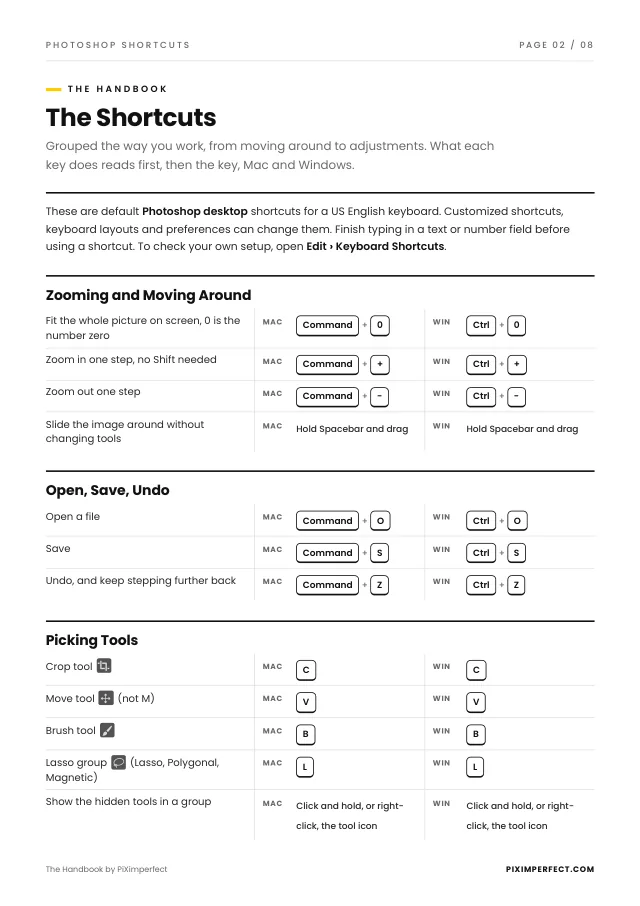
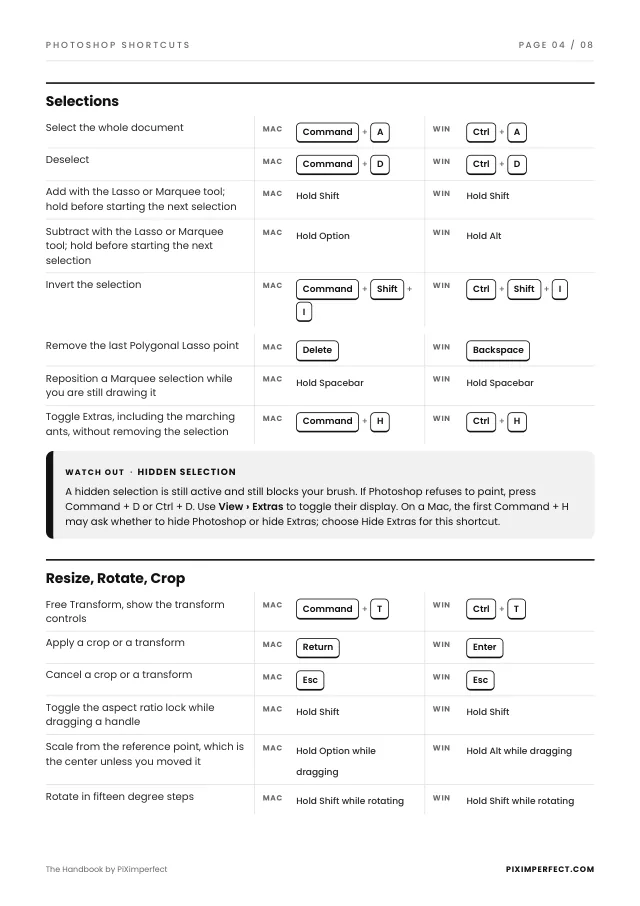
What each key does reads first, then the key, for Mac and for Windows. Print it and keep it next to your monitor.
- Zooming and moving aroundFit the picture on screen, zoom in and out, slide the image around
- Open, save, undoThe three keys you will press in every session
- Picking toolsCrop, Move, Brush and the Lasso, and how to reach the hidden tools
- The brushSize and hardness on the canvas, straight lines, picking a color
- Colors and fillingDefault colors, swapping them, filling a selection
- SelectionsSelect all, deselect, add, subtract, invert, hide the marching ants
- Resize, rotate, cropFree Transform, apply or cancel, and the keys that hold the shape
- LayersNew, duplicate, group, solo, rename, opacity, Stamp Visible
- Layer masksInvert, view on its own, switch off, copy, the negative mask
- AdjustmentsReopen any adjustment, see clipping in Curves, the little hand